# Proxmox FAQ

# Proxmox local erweitern / neu erstellen

bash vom pve öffnen und folgende Befehle ausführen:

- mkdir /pool
- pvesm remove local-lvm
- pvesm remove local
- lvremove /dev/pve/data
- lvresize -l +100%FREE --resizefs /dev/pve/root

im Proxmox danach auf Rechenzentrum &gt; Storage &gt; Verzeichnis → /pool → Images, ISO, etc… anlegen

Danach Storage “local” deaktivieren in RZ &gt; Storage

# externe USB Festplatte mounten

**per ssh mit Proxmox verbinden**

<div class="editor-markdown-main" id="bkmrk-mount-ordner-erstell"><div class="editor-markdown-preview"><div class="editor-markdown-preview-content contents"><div contenteditable="false">- Mount Ordner erstellen : ***mkdir /mnt/usbplatte***
- per Proxmox GUI unter Rechenzentrum &gt; Storage &gt; Hinzufügen (Verzeichnis) (z.B. VZDUMP als Inhalt)
- per ssh Festplatte raussuchen: ***fdisk -l***
- Mounten der Festplatte per Befehl: ***mount /dev/sdb1 /mnt/backup***

</div></div></div></div>> Für permantentes Mounten:

UUID auslesen per ssh auf Proxmox: ***ls -l /dev/disk/by-uuid***  
UUID irgendwo notieren und fstab bearbeiten per: ***nano /etc/fstab***

und als Zeile folgendes hinterlegen:

***UUID=c1d271f9-ebad-4e3d-8b87-fa654044xyz /mnt/usbfestplatte ext4 defaults,noatime,nofail 0 2***

Sollte es eine neue Festplatte sein, muss diese vorher formatiert sein

<div class="v-system-bar editor-markdown-sysbar theme--dark grey darken-3" id="bkmrk-">  
</div>

# Synology vDSM als Docker in LXC

1. LXC Container erstellen, Updates und Docker Compose installieren
2. Script auf Proxmox Server ausführen:

```bash
#!/bin/bash

# Constants
CONFIG_DIR="/etc/pve/lxc"
TMP_DIR="/tmp"

# Function to display log messages
log() {
    echo -e "$1"
}

# Function to display error and exit
function display_error_and_exit() {
    log "Error: $1 Exiting."
    exit 1
}

# Function to display information
function display_info {
    clear
    log "This script is used to configure prerequisites to run Synology Virtual DSM"
    log "in a Docker container inside an unprivileged Proxmox LXC container."
    log "Please run this script on the Proxmox host, not inside the LXC container.\n"
}

# Check for root privileges
if [ "$EUID" -ne 0 ]; then
    display_error_and_exit "Please run this script as root."
fi

display_info

read -p "Do you want to continue? (y/n): " choice

if [[ $choice == "y" || $choice == "Y" ]]; then
    read -p "Enter the LXC Container ID (CT ID): " ct_id

    # Check if ct_id is a non-empty numeric value
    if [[ ! $ct_id =~ ^[0-9]+$ ]]; then
        display_error_and_exit "Invalid LXC Container ID. Please enter a numeric value."
    fi

    # Check if the configuration file exists
    config_file="$CONFIG_DIR/$ct_id.conf"
    if [[ ! -f "$config_file" ]]; then
        display_error_and_exit "Configuration file $config_file does not exist."
    fi

    # Check if the LXC container is running
    container_status=$(pct status $ct_id 2>&1)
    if [[ "$container_status" == *"running"* ]]; then
        log "Stopping running LXC container $ct_id..."
        pct stop $ct_id || display_error_and_exit "Failed to stop LXC container $ct_id."
    fi

    # Remove existing dev folder and tun, kvm, and vhost-net devices
    if [[ -d "/dev-$ct_id" ]]; then
        log "Removing existing /dev-$ct_id folder..."
        rm -r "/dev-$ct_id" || display_error_and_exit "Failed to remove existing /dev-$ct_id folder."
    fi

    # Function to configure devices
    function configure_device() {
        device=$1
        module=$2
        major=$3
        minor=$4

        log "Configuring $device..."
        mkdir -p "/dev-$ct_id/net" || display_error_and_exit "Failed to create /dev-$ct_id/net"
        mknod "/dev-$ct_id/$device" c $major $minor || display_error_and_exit "Failed to mknod /dev-$ct_id/$device"
        chown 100000:100000 "/dev-$ct_id/$device" || display_error_and_exit "Failed to chown /dev-$ct_id/$device"

        #log "Checking if /dev-$ct_id/$device exists..."
        if ! [[ -e "/dev-$ct_id/$device" ]]; then
            display_error_and_exit "/dev-$ct_id/$device should have been created but does not exist."
        fi
    }

    # Configure devices
    configure_device "net/tun" "tun" 10 200
    configure_device "kvm" "kvm" 10 232
    configure_device "vhost-net" "vhost-net" 10 238

    # Check and add configuration lines to /et/pve/lxc/<CT ID>.conf
    log "Checking and adding configuration to $config_file..."
    lines_to_add=(
        "lxc.mount.entry: /dev-$ct_id/net/tun dev/net/tun none bind,create=file 0 0"
        "lxc.mount.entry: /dev-$ct_id/kvm dev/kvm none bind,create=file 0 0"
        "lxc.mount.entry: /dev-$ct_id/vhost-net dev/vhost-net none bind,create=file 0 0"
    )

    # Error handling for config file changes
    for line in "${lines_to_add[@]}"; do
        if ! grep -qF "$line" "$config_file"; then
            echo "$line" >> "$config_file" || display_error_and_exit "Failed to add line '$line' to $config_file."
        fi
    done

    log "Configuration completed successfully.\n\nStart the docker image (vdsm/virtual-dsm:latest) inside the LXC container."

else
    clear
    log "\nScript aborted. No changes were made."
fi
```

virtuelle Festplatte erstellen, Mountpoint ist aus der <span style="background-color:rgb(129,232,172);">docker-compose.yaml </span>zu entnehmen / anzupassen:

```yaml
services:
  dsm:
    container_name: dsm
    image: vdsm/virtual-dsm
    environment:
      DISK_SIZE: "10G"
    devices:
      - /dev/kvm
    cap_add:
      - NET_ADMIN
    ports:
      - 5000:5000
      - 5001:5001
    volumes:
      - /syno-space/dsm:/storage
    stop_grace_period: 2m
```

<p class="callout success">[GitHub - vdsm/virtual-dsm: Virtual DSM in a Docker container.](https://github.com/vdsm/virtual-dsm)</p>

# IMG Datei in Proxmox importieren

Download der Datei über z.B wget

```bash
wget https://tombehrendt.de/download.img
```

Danach kann das IMG in die ensprechende VM sowie dem richtigen Storage importiert werden:

```bash
qm importdisk 110 download.img mypool
```

<p class="callout info">110 = VM ID</p>

<p class="callout info">download.img = IMG Datei, die importiert werden soll</p>

<p class="callout info">mypool = Storage-Pool von Proxmox</p>

[![image.png](https://bs.tombehrendt.de/uploads/images/gallery/2024-08/scaled-1680-/Qd3Zpr3eTO4QJA4S-image.png)](https://bs.tombehrendt.de/uploads/images/gallery/2024-08/Qd3Zpr3eTO4QJA4S-image.png)

# Passthrough von Festplatten in virtuelle Maschinen

Mittels per Befehl die aktuellen Festplatten anzeigen lassen:

```bash
ls -lah /dev/disk/by-id
```

[![image.png](https://bs.tombehrendt.de/uploads/images/gallery/2024-09/scaled-1680-/PznYYZOsGGOIr6q2-image.png)](https://bs.tombehrendt.de/uploads/images/gallery/2024-09/PznYYZOsGGOIr6q2-image.png)
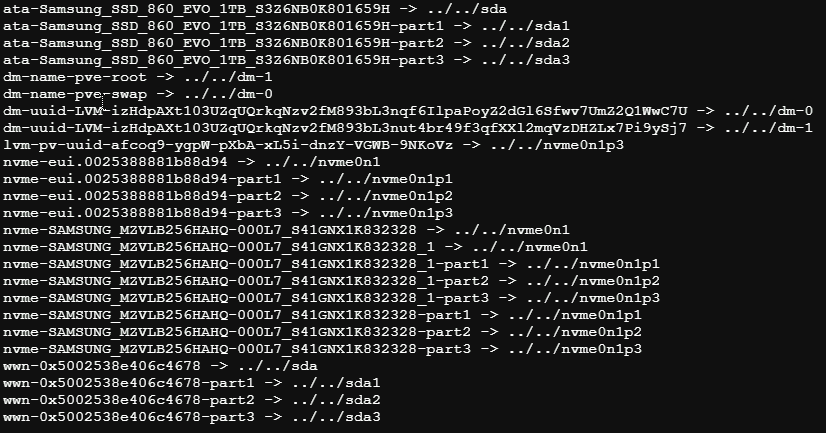
<p class="callout info">Part 1, Part 2, etc sind Partitionen! </p>

Um eine Festplatte an eine VM durchzureichen, folgenden Befehl ausführen:

```bash
qm set 222 -sata1 /dev/disk/by-id/ata-Samsung_SSD_860_EVO_1TB_XXXXXXXX
```

<p class="callout info">Die "222" ist dem Fall die VM ID! Sata1 ist der SATA-Port, der virtuell auf der VM steckt.</p>

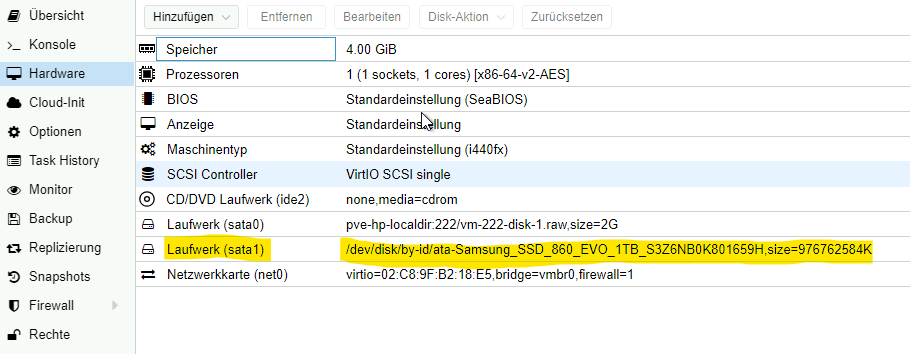
Danach ist die SATA Festplatte der VM zugewiesen und wird direkt durchgereicht:

[![image.png](https://bs.tombehrendt.de/uploads/images/gallery/2024-09/scaled-1680-/S6jK2wKGSQwJcJio-image.png)](https://bs.tombehrendt.de/uploads/images/gallery/2024-09/S6jK2wKGSQwJcJio-image.png)